The Quiet Guardian: Designing Ambient Proactive UX
The next generation of AI products won't be dashboards or chatbots. They'll be ambient companions that watch, learn, and act on your behalf — and designing them requires a fundamentally different UX vocabulary.
“The best technology is the technology you don’t notice.” — Mark Weiser, “The Computer for the 21st Century” (1991)
You land twenty minutes late. The flight from Chicago sat on the tarmac for forty-five minutes — mechanical delay, no estimate, the usual quiet dread of watching your evening plans dissolve in real time. But when you step off the jet bridge and check your phone, something strange has happened. Or rather, something strange hasn’t happened. There are no frantic texts from your dinner companion. No missed calls from the restaurant. Instead, there’s a single quiet summary: Your reservation at Etta was moved from 7:30 to 8:00. Sarah was notified. Your car pickup was adjusted — arriving at B2 in 4 minutes.
You didn’t ask for any of this. You didn’t open an app, dictate a command, or tap a notification. The system watched your flight status shift, inferred the downstream consequences, and handled them. You just walked off the plane and into a car that was already waiting.
This isn’t science fiction. Every piece of this is technically possible today. The flight data is public. The restaurant API exists. The messaging is trivial. The car service is a webhook. What’s missing isn’t the technology. What’s missing is the design vocabulary — the set of principles that tells a product team when to act silently, when to nudge gently, and when to interrupt with urgency.
Most teams building agentic AI products are solving this wrong. They’re building dashboards full of agent activity logs when they should be building something closer to a relationship — a system that earns trust not by showing you everything it does, but by showing you only what genuinely needs your attention and handling the rest with quiet competence.
This essay drafts that vocabulary. We’ll work through five concepts — a proactivity spectrum, a severity model, narrative event grouping, minimum-viable-interruption cards, and ambient time awareness — and by the end you’ll be able to combine them in a live demo and feel the tradeoffs yourself. Before we build each concept in detail, here’s how they compose. Every event the system detects flows through this stack:
Click any concept name to jump to its section, or read straight through. At the end, you’ll find a working demo where you can combine all five concepts and feel the tradeoffs yourself.
Relationships, Not Features
The dominant mental model for AI products today is the tool. You open it, you use it, you close it. Chatbots, copilots, command palettes — they all share an assumption baked into the interaction: the human initiates, and the system responds. This is the request-response paradigm, and it works well for a huge range of problems. But it breaks down completely when the system knows something important before you think to ask.
Consider the difference between a weather app and a good travel companion. The weather app waits for you to open it. The companion notices dark clouds building in the direction you’re driving, checks the radar, and suggests you leave thirty minutes early. The information is identical. The relationship is entirely different.
This is the shift from reactive to proactive design, and it requires a fundamentally different set of assumptions. A reactive system optimizes for response quality — how good is the answer when you ask? A proactive system optimizes for intervention timing — how good is the judgment about when to speak up and when to stay quiet? Get the timing wrong in a reactive system and you have a slow tool. Get the timing wrong in a proactive system and you have a nag. Or worse, a ghost — a system that should have warned you and didn’t.
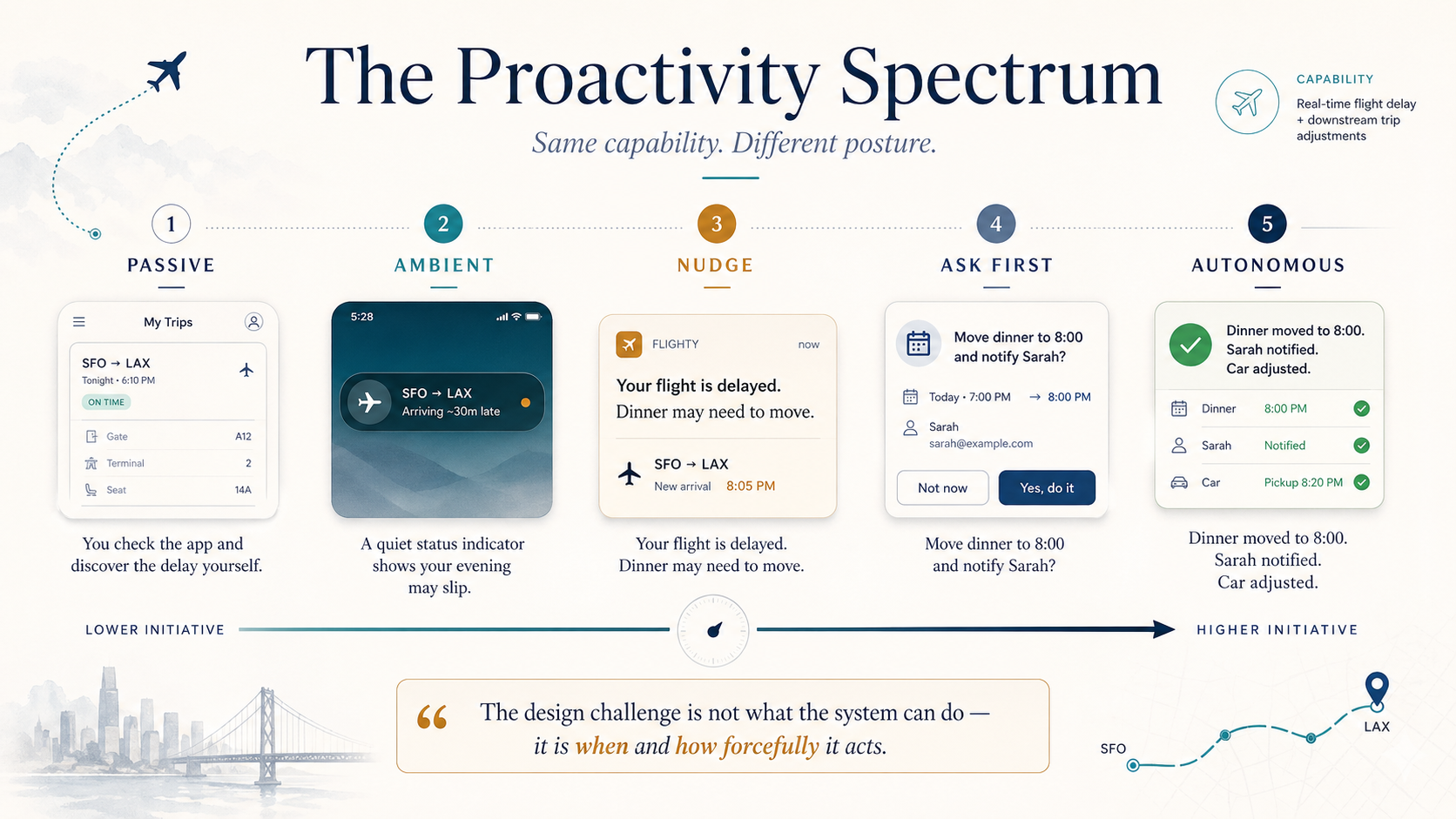
The core design variable is what I’ll call the proactivity spectrum. At one end, the system is fully passive: it does nothing unless explicitly asked. At the other end, it’s fully autonomous: it acts on your behalf without confirmation. Most interesting products live somewhere in the middle, and the right position on the spectrum changes depending on context. You want your email assistant to silently archive newsletters but loudly flag a message from your CEO. Same system, same user, different proactivity levels for different situations.
The challenge is that proactivity isn’t a single slider — it’s a field of decisions. For every type of event the system might detect, the team needs to decide: Should we act silently? Show an ambient indicator? Send a gentle nudge? Demand immediate attention? And how should those decisions shift based on time pressure, user state, and historical preference?
As you move along the spectrum, the underlying capability doesn’t change — the system always knows about the delay, always has the ability to rebook. What changes is the posture. At low proactivity, the system is a well-organized filing cabinet: all the information is there if you go looking. At high proactivity, it’s a chief of staff who handles logistics so you can focus on the meeting. The same technical capability feels like a completely different product depending on where you set this dial. That’s the core design challenge — not what the system does, but when and how forcefully it communicates what it’s done.
The Severity Model
If proactivity is about the system’s general posture, severity is about individual decisions. Every event the system detects needs to be classified: How much of the user’s attention does this deserve? Get this wrong and you either cry wolf (destroying trust through false urgency) or bury the signal (destroying trust through negligence).
Aviation solved this problem decades ago. The Engine Indicating and Crew Alerting System (EICAS) on modern aircraft uses a strict four-tier hierarchy. Level 1: warning — red, master caution light, audio alarm, demands immediate action. Level 2: caution — amber, requires timely awareness. Level 3: advisory — text message, no alarm, crew should know but needn’t act now. And below all of these: the normal operating display, which shows status without any alert at all.
The genius of EICAS isn’t the color coding. It’s the boundary discipline. An enormous amount of engineering goes into deciding which events belong at which level. An engine fire is Level 1, always. A slight oil temperature rise is Level 3. There is no ambiguity, no “it depends on the pilot’s preferences.” The classification is burned into the system because the cost of getting it wrong — alarm fatigue, missed warnings, cognitive overload — is catastrophic.
Consumer software has no equivalent discipline. Most products have exactly two tiers: “notification” and “no notification.” Maybe three if you count badges. The result is predictable: everything gets shoved into the notification tier because the product team is afraid of the user missing something, and the user responds by ignoring everything. This is alarm fatigue at scale, and it’s the central failure mode of every notification system ever built.
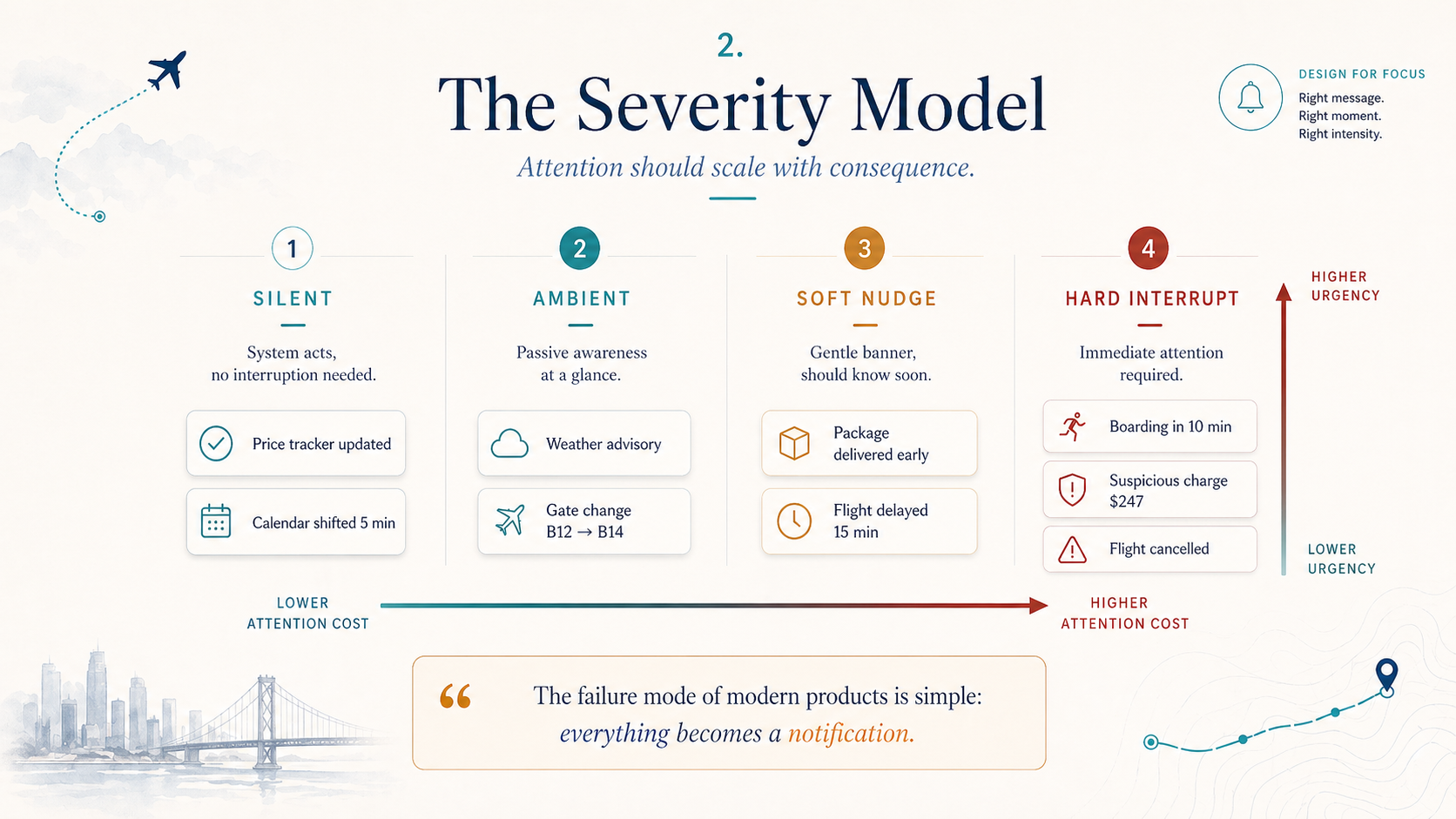
For ambient proactive systems, I propose a four-tier model that maps loosely to EICAS but adapts for civilian stakes:
Silent: The system acted and no user awareness is needed. Moving a calendar event by five minutes. Auto-archiving a spam email. Updating a price tracker. These actions appear in the activity log if you go looking, but they generate zero interruption.
Ambient: The user should be passively aware. A small status indicator changes color. No sound, no banner, no lock-screen presence. This is information available at a glance for the user who happens to be looking.
Soft Nudge: The user should know about this within the next few minutes. A gentle banner that can be dismissed. A single haptic tap. The tone is informational, not urgent: Your package arrived early. It’s at the front desk. The key attribute of a soft nudge is that ignoring it for an hour has no real consequence.
Hard Interrupt: The user needs to know now, and probably needs to make a decision. Full notification. Sound. Possibly a phone call. The bar for this tier should be high — in a well-designed system, hard interrupts happen a few times a week, not a few times a day.
The boundaries between these tiers are the most important design decisions you’ll make on an ambient product. They encode your product’s implicit theory of what deserves human attention — and by extension, what doesn’t. A team that puts package deliveries in the Hard Interrupt tier is telling users that their attention is cheap. A team that puts fraud alerts in the Ambient tier is telling users that their security doesn’t matter. Where your classifications diverge from another team’s is revealing — those disagreements aren’t bugs, they’re the frontier of product opinion.
Stories, Not Metrics
Once you have a severity model, you face a presentation problem. An ambient system that manages your travel, finances, home, and schedule might take dozens of actions per day. Even if most are Silent or Ambient, the remaining nudges and interrupts can pile up fast. The instinct is to show a feed — a chronological list of events — but feeds inherit all the pathologies of the notification inbox. They’re noisy, context-free, and they force the user to do the cognitive work of connecting related events.
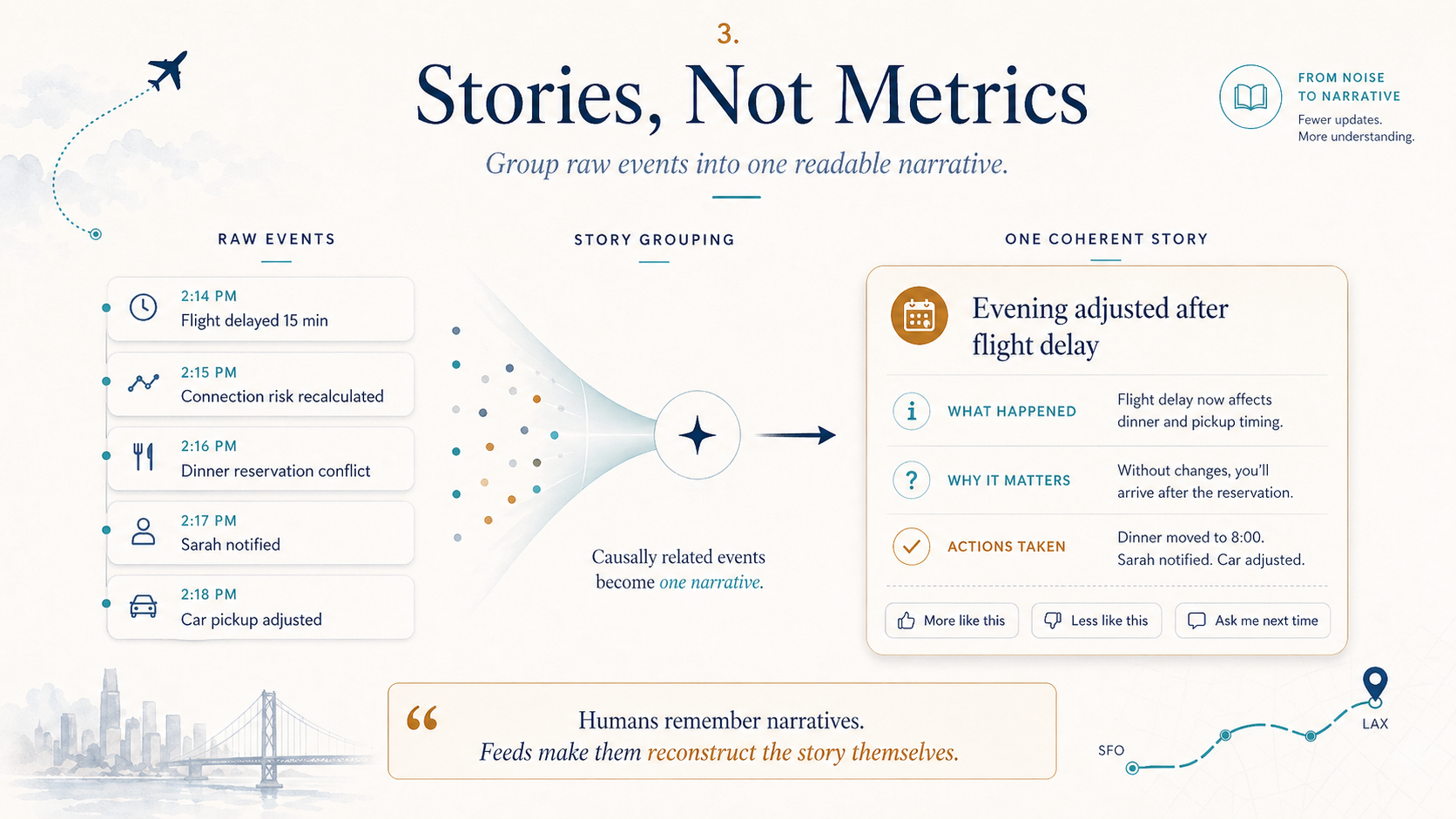
The better unit of communication is the story. A story is a chain of causally related events that the system groups into a single narrative. Instead of six separate notifications — flight delayed, restaurant notified, reservation moved, car rescheduled, Sarah texted, new ETA calculated — you get one: Your evening was reorganized because your flight was delayed. Here’s what happened and here’s the current plan.
This is not a cosmetic difference. It changes the fundamental relationship between user and system. Six notifications feel like noise — a system bombarding you with status updates. One story feels like care — a system that understood the situation, handled it, and is now briefing you on the outcome. The emotional register shifts from “why is my phone buzzing” to “oh, that’s been taken care of.”
Stories also solve the legibility problem. When a proactive system acts silently, users need a way to review what happened — not because they’re suspicious, but because understanding the system’s behavior is how trust develops. A chronological event log is technically complete but narratively incoherent. A story log is a series of small episodes, each with a beginning (trigger event), a middle (actions taken), and an end (current state). Users can scan story titles and drill into the ones they care about, the same way you’d scan headlines rather than reading raw wire service dispatches.
The structure of a story also creates natural feedback surfaces. Instead of asking “Was this notification helpful?” — a question that makes sense for individual events but collapses when events are interconnected — you can ask “Did we handle this well?” at the story level. The user is evaluating a coherent sequence of decisions, not an isolated ping. The individual events are identical in both views. But the story creates meaning that the raw events don’t carry on their own — you can see the reasoning, the causal chain: the system moved the reservation because the flight was delayed, and it notified Sarah because the reservation moved. Six notifications feel like your phone is having a seizure. One story feels like someone competent handled a problem on your behalf.
The Nudge Card
Even with good severity classification and story grouping, you’ll still have moments where the system needs the user’s attention — the Soft Nudge and Hard Interrupt tiers. The design of these interruptions matters enormously, because every interruption is a withdrawal from the trust account. Interrupt well, and the user thinks: “I’m glad I was told.” Interrupt poorly, and the user thinks: “Why am I being bothered with this?”
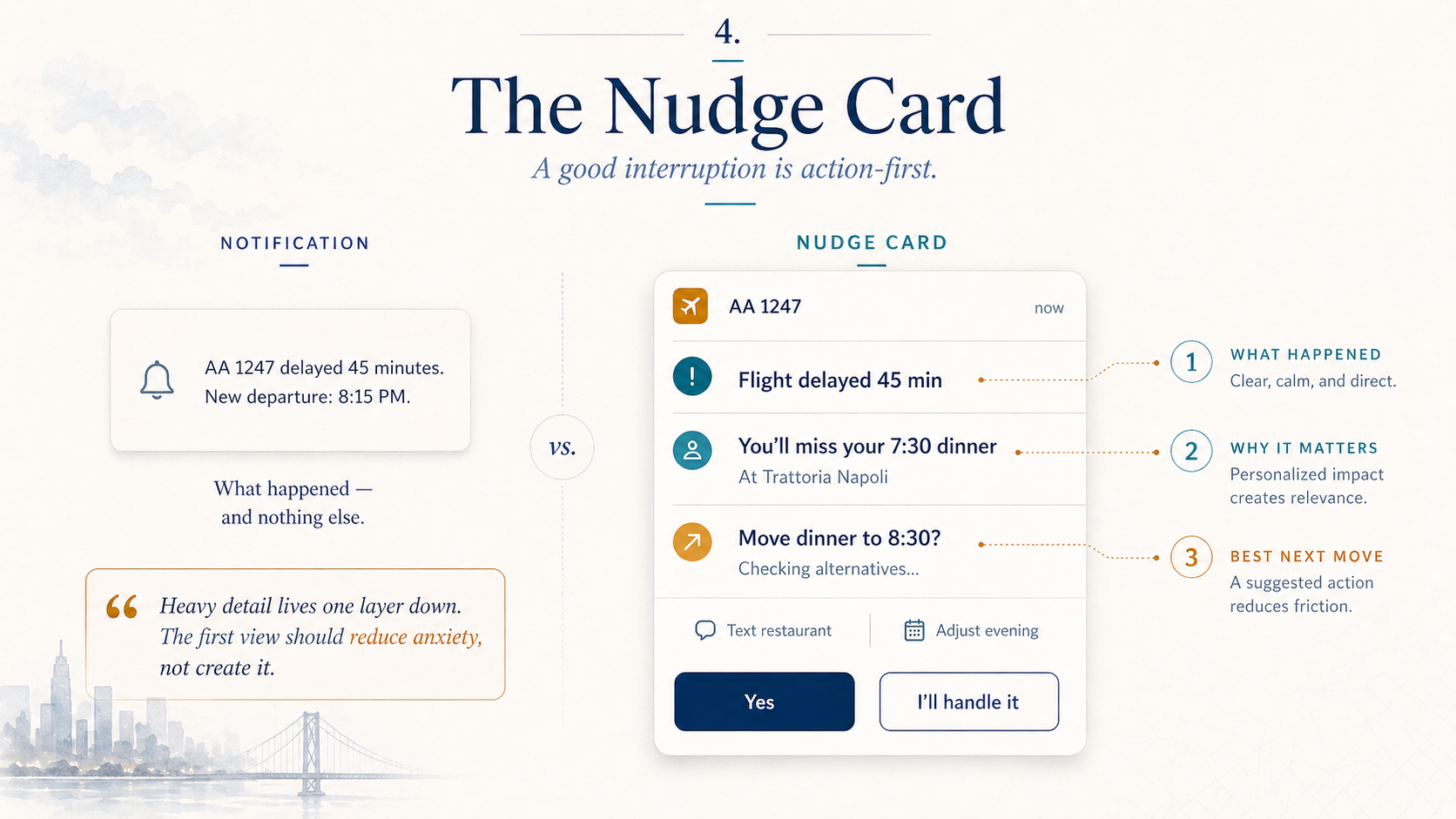
The difference comes down to what I call the Nudge Card — the minimum viable interruption. A nudge card is not a notification. A notification says “something happened.” A nudge card answers three questions in a single, compact view:
- What happened? A one-line summary of the event or situation.
- Does it matter? Why this deserves your attention right now, in context.
- What’s the best next move? One or two concrete proposed actions.
The critical design principle is action-first. The card doesn’t just inform — it proposes. Instead of “Your flight to Denver is delayed 45 minutes,” a nudge card says: “Your flight is delayed 45 min. Move dinner to 8:30? [Yes / I’ll handle it].” The user’s most common path is a single tap. The cognitive load is near zero: read, decide, tap.
Heavy detail is always one level down, never in the card itself. If you want to see the full flight status, the alternative rebooking options, the restaurant’s cancellation policy — tap through. But the first view is a crisp summary with a proposed resolution. This respects the user’s attention by front-loading the decision and back-loading the context.
The tone matters as much as the structure. Nudge cards should read like a good assistant’s text message, not like a system alert. “Heads up: there’s a $247 charge from a merchant you’ve never used. Looks suspicious. Block card and investigate?” Compare this to the standard bank notification: “ALERT: Transaction $247.00 at MERCH#8829234. If unauthorized, call 1-800-…” The information content is the same. The emotional response is completely different. One feels like someone watching out for you. The other feels like a legal disclaimer.
Notification
Nudge Card
The difference between a notification and a nudge card is the difference between “something happened” and “here’s what to do about it.” One generates anxiety — a vague sense that you need to deal with something, without clarity on what “dealing with it” means. The other generates trust — a specific situation with a specific proposal that you can accept, modify, or override. Anxiety compounds. Trust compounds. Over weeks of use, the difference in how a user feels about the product is enormous.
Time as a Gentle Presence
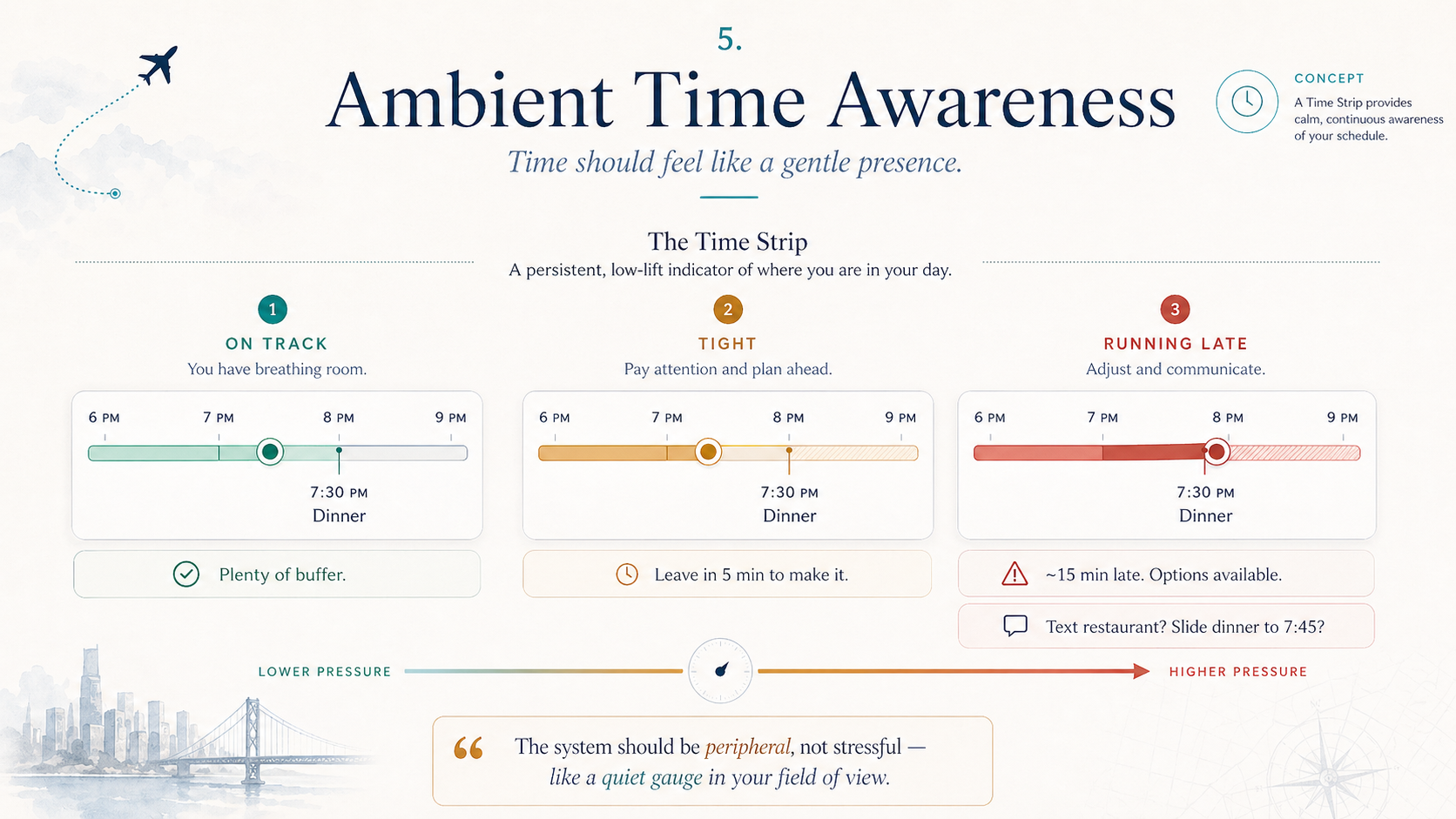
The last piece of the vocabulary is the hardest to get right: ambient time awareness. Proactive systems need to communicate temporal information — you’re running late, this window is closing, your schedule shifted — without turning the interface into a source of stress. Clocks and calendars are the bluntest instruments imaginable for this. A calendar shows you blocks of committed time. A clock shows you the current moment. Neither tells you what you actually need to know: Am I on track, and if not, what should change?
The concept I want to introduce is the Time Strip — a persistent, ambient indicator of schedule status that replaces the calendar-as-truth with a softer, more human representation. A time strip doesn’t show you appointments. It shows you a feeling: on track, getting tight, running about ten minutes behind. The visual treatment should be calm — a gentle indicator that shifts from green to amber to red as temporal pressure increases.
The Time Strip earns its place through what it doesn’t do. It doesn’t ping you. It doesn’t pop up reminders. It doesn’t make sounds. It sits in your peripheral vision like a well-designed dashboard gauge — you can check it whenever you want, but it never demands that you do. The information is available at a glance: a warm amber dot means “you’re okay but don’t linger,” and that’s enough to nudge behavior without triggering the anxiety response that calendar alerts produce.
When the strip does shift — when you go from “on track” to “tight” — the system should offer a natural language suggestion: “You’ll be ~15 min late for Lupa. Text them? Slide dinner to 7:45?” Not “open the calendar app, find the event, change the time, compose a message to the attendees, send.” One sentence. The system handles the decomposition. Tell the restaurant, adjust the car, notify your dinner companion, recalculate the route. You said one thing. Six things happened.
The deepest design insight here is that time awareness should be peripheral, not focal. The moment time becomes the center of attention, you’ve failed — you’ve built a clock, not a companion. The time strip succeeds when the user forgets it’s there during relaxed moments and notices it instinctively during pressured ones. Like a good copilot who stays quiet on a clear highway and speaks up when traffic thickens.
On track
Tight
Running late
Notice the proportionality. At “on track,” the system is invisible. At “tight,” it’s gently present. At “running late,” it’s actively proposing solutions. The interface didn’t transform. The ambient pressure did, and the system matched its posture to yours. That proportionality — the system’s energy level matching your situation’s urgency — is what separates a guardian from a nag.
Try It Yourself
Now let’s put all five concepts together. The demo below runs the same event through the full pipeline. Choose a scenario, adjust the proactivity level, and toggle between raw events and story view. Same underlying capability — completely different user experience depending on how you set the dials.
Minor delay — monitoring
Notice how the system’s posture changes everything. At low proactivity, you have a well-organized log. At high proactivity, you have a chief of staff. The technology is identical. The relationship is not.
Trust Is the Product
Every design decision in an ambient proactive system ultimately comes back to a single question: Does this build trust or erode it? A system that acts without explanation erodes trust. A system that interrupts without cause erodes trust. A system that misses something important and stays silent erodes trust. But a system that shows you what it did, explains why, and asks how to do better next time — that system earns something no feature list can buy.
Legibility is the mechanism. After every story, the system should offer a brief, readable account of its reasoning: I moved the reservation because your flight was delayed past the original dinner time. I chose to text Sarah rather than call because your preference history shows you prefer text for non-urgent updates. I didn’t rebook the flight because the delay was under 60 minutes and your connection wasn’t at risk. This isn’t a debug log. It’s a trust-building narrative that says: I’m not a black box. You can see how I think. And you can correct me.
Feedback must be first-class, not an afterthought. Every story should end with three options: More like this — the system did well, reinforce the pattern. Less like this — the system overstepped or misjudged, adjust. Ask me next time — the user isn’t sure, and wants to be consulted before the system acts independently on this type of event in the future. These three options cover the full space of trust calibration without requiring the user to think about settings, preferences, or configuration screens. The system learns the user’s boundaries the same way a good colleague does — through feedback on real situations, not through abstract preference surveys.
Five things an ambient system must do to earn trust:
The one-sentence promise an ambient system makes to its user is this: I show you only things that genuinely need your attention, and I handle the rest. That’s a bold promise. It means the system must have excellent judgment about what “genuinely” means — and when it’s wrong, it must be correctable quickly and gracefully. The severity model provides the framework. The story structure provides the legibility. The nudge card provides the interaction. The time strip provides the ambient awareness. And the feedback loop provides the correction mechanism.
Building an ambient proactive system is not a machine learning problem or an API integration problem, though it involves both. It is fundamentally a relationship design problem. The system must earn the right to act on your behalf through consistent, competent, transparent behavior — and it must never stop earning it. Every silent action that turns out to be wrong, every interruption that turns out to be unnecessary, every missed event that should have been flagged — these are withdrawals from an account that takes weeks to build and seconds to empty.
The best ambient system is one you forget is there. Not because it’s inactive, but because it’s so reliably attuned to your life that its presence feels like a natural extension of your own attention. You don’t think about it the way you don’t think about a good thermostat — it just keeps the temperature right. Until the moment something goes wrong, and you realize it was already three steps ahead, quietly rearranging the evening so you could walk off a delayed flight and straight into a dinner that was waiting for you.
Stop building dashboards. Start building relationships.