DataHub: Popular Metadata Architectures Explained
Shirshanka Das
When I started my journey at LinkedIn ten years ago, the company was just beginning to experience extreme growth in the volume, variety, and velocity of our data. Over the next few years, my colleagues and I in LinkedIn’s data infrastructure team built out foundational technology like Espresso, Databus, and Kafka, among others, to ensure that LinkedIn would survive and thrive through the next wave of growth. A few years later, I became the tech lead for what was then a pretty small “data analytics infrastructure” team that ran and supported LinkedIn’s Hadoop usage, and also maintained a hybrid data warehouse spanning Hadoop and Teradata.
Highlights & Annotations
This begs the question: how are each of these platforms different, and which option is best for companies thinking of adopting one of these tools?
Ref. 2D4F-A
Before we dive into the different architectures, let’s get our definitions in order. One of the simplest definitions for a data catalog I’ve found is from the Oracle website: “Simply put, a data catalog is an organized inventory of data assets in the organization. It uses metadata to help organizations manage their data. It also helps data professionals collect, organize, access, and enrich metadata to support data discovery and governance.”
Ref. 5971-B
Thirty years ago, a data asset was likely a table in an Oracle database. In a modern enterprise, though, we have a dazzling array of different kinds of assets that comprise the landscape: tables in relational databases or in NoSQL stores, streams in your favorite stream store, features in your AI system, metrics in your metrics platform, dashboards in your favorite visualization tool, etc. The modern data catalog is expected to contain an inventory of all these kinds of data assets and enable data workers to be more productive at getting things done with those assets.
Ref. F708-C
Thirty years ago, a data asset was likely a table in an Oracle database. In a modern enterprise, though, we have a dazzling array of different kinds of assets that comprise the landscape: tables in relational databases or in NoSQL stores, streams in your favorite stream store, features in your AI system, metrics in your metrics platform, dashboards in your favorite visualization tool, etc. The modern data catalog is expected to contain an inventory of all these kinds of data assets and enable data workers to be more productive at getting things done with those assets.
Ref. F708-D
Here are a few common use cases and a sampling of the kinds of metadata they need:
Ref. AF99-E
Push versus pull: While it is easy to get started with crawling data sources as a way to collect metadata and aggregate it in a single place, very soon these ingestion pipelines start showing signs of fragility. The crawler runs in a different environment than the data source and its configuration needs to be managed separately by the central team. So, one set of problems in these pipelines is operational hurdles like network connectivity (firewall rules) or credential sharing (passwords can change without notifying the central team).
Ref. C47B-F
Push versus pull: While it is easy to get started with crawling data sources as a way to collect metadata and aggregate it in a single place, very soon these ingestion pipelines start showing signs of fragility. The crawler runs in a different environment than the data source and its configuration needs to be managed separately by the central team. So, one set of problems in these pipelines is operational hurdles like network connectivity (firewall rules) or credential sharing (passwords can change without notifying the central team).
Ref. C47B-G
Metadata freshness: Closely related to this decision to push versus pull is the issue of data (or in this case, metadata) freshness. In the beginning of your metadata journey, it might seem completely okay to crawl your Hive metastore (or S3 buckets) once per night and populate the catalog. After all, you’re just trying to make data scientists more productive than they were before. However, once you start getting into the data creation workflow (e.g., once you have created some data, you can come here and provide data classification tags) or providing operational metadata (e.g., the data quality manifest for your latest partition), then the freshness of the metadata starts mattering a lot more. If you just have a crawl-based metadata catalog, you’re mostly out of luck at that point.
Ref. C28D-H
These systems play an important role in making humans more productive with data, but can struggle underneath to keep a high-fidelity data inventory and to enable programmatic use cases of metadata.
Ref. 32DF-I
These systems play an important role in making humans more productive with data, but can struggle underneath to keep a high-fidelity data inventory and to enable programmatic use cases of metadata.
Ref. 32DF-J

Ref. 2D6E-K
Better contracts lead to better outcomes: Providing a push-based schema-ed interface immediately creates good contracts between producers of metadata and the “central metadata team.” You still have to convince the producing team to emit metadata and take the dependency, but it is so much easier to do that with an agreed-upon schema.
Ref. 1E21-L
Programmatic use cases enabled: With a service API, the central team can finally enable programmatic use cases for metadata. For example, if your data portal application allows for tagging your datasets and fields with tags that specify the semantic-type of the field (e.g., email_address, customer_identifier) and stores that information in your metadata system, your data management infrastructure can start using this metadata to automatically delete data assets for customer ids that have requested the right to be forgotten, or to automatically create pseudonymised versions of these datasets for data scientists. In fact, at LinkedIn, we use Apache Gobblin to do exactly that, driven by metadata from DataHub.
Ref. 6BF2-M
Programmatic use cases enabled: With a service API, the central team can finally enable programmatic use cases for metadata. For example, if your data portal application allows for tagging your datasets and fields with tags that specify the semantic-type of the field (e.g., email_address, customer_identifier) and stores that information in your metadata system, your data management infrastructure can start using this metadata to automatically delete data assets for customer ids that have requested the right to be forgotten, or to automatically create pseudonymised versions of these datasets for data scientists. In fact, at LinkedIn, we use Apache Gobblin to do exactly that, driven by metadata from DataHub.
Ref. 6BF2-N
Programmatic use cases enabled: With a service API, the central team can finally enable programmatic use cases for metadata. For example, if your data portal application allows for tagging your datasets and fields with tags that specify the semantic-type of the field (e.g., email_address, customer_identifier) and stores that information in your metadata system, your data management infrastructure can start using this metadata to automatically delete data assets for customer ids that have requested the right to be forgotten, or to automatically create pseudonymised versions of these datasets for data scientists. In fact, at LinkedIn, we use Apache Gobblin to do exactly that, driven by metadata from DataHub.
Ref. 6BF2-O
Programmatic use cases enabled: With a service API, the central team can finally enable programmatic use cases for metadata. For example, if your data portal application allows for tagging your datasets and fields with tags that specify the semantic-type of the field (e.g., email_address, customer_identifier) and stores that information in your metadata system, your data management infrastructure can start using this metadata to automatically delete data assets for customer ids that have requested the right to be forgotten, or to automatically create pseudonymised versions of these datasets for data scientists. In fact, at LinkedIn, we use Apache Gobblin to do exactly that, driven by metadata from DataHub.
Ref. 6BF2-P
Programmatic use cases enabled: With a service API, the central team can finally enable programmatic use cases for metadata. For example, if your data portal application allows for tagging your datasets and fields with tags that specify the semantic-type of the field (e.g., email_address, customer_identifier) and stores that information in your metadata system, your data management infrastructure can start using this metadata to automatically delete data assets for customer ids that have requested the right to be forgotten, or to automatically create pseudonymised versions of these datasets for data scientists. In fact, at LinkedIn, we use Apache Gobblin to do exactly that, driven by metadata from DataHub.
Ref. 6BF2-Q
Programmatic use cases enabled: With a service API, the central team can finally enable programmatic use cases for metadata. For example, if your data portal application allows for tagging your datasets and fields with tags that specify the semantic-type of the field (e.g., email_address, customer_identifier) and stores that information in your metadata system, your data management infrastructure can start using this metadata to automatically delete data assets for customer ids that have requested the right to be forgotten, or to automatically create pseudonymised versions of these datasets for data scientists. In fact, at LinkedIn, we use Apache Gobblin to do exactly that, driven by metadata from DataHub.
Ref. 6BF2-R
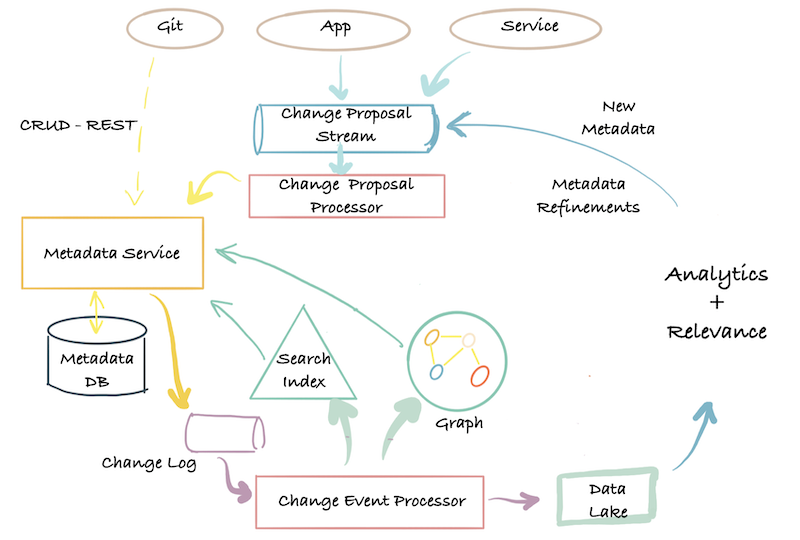
There is no change log: The second-generation architecture offers a micro-service based API for reading and writing metadata, but there is no built-in support for streaming in changes to metadata from external systems or for subscribing to the stream of metadata changes happening to the data catalog.
Ref. 6BB0-S
There is no change log: The second-generation architecture offers a micro-service based API for reading and writing metadata, but there is no built-in support for streaming in changes to metadata from external systems or for subscribing to the stream of metadata changes happening to the data catalog.
Ref. 6BB0-T
There is no change log: The second-generation architecture offers a micro-service based API for reading and writing metadata, but there is no built-in support for streaming in changes to metadata from external systems or for subscribing to the stream of metadata changes happening to the data catalog.
Ref. 6BB0-U
The problem with centralized teams: The other big problem with this architecture is that it continues to depend on a centralized team for too many things: owning the metadata model, running the central metadata service and data stores and indexes, and supporting all the downstream consumers and the different ways in which they want to access the metadata. This severely limits the central system’s ability to power the diversity of use cases (productivity, governance, AI explainability, and so on) that exist in the company. At LinkedIn, for example, when we were still in the second generation of our metadata architecture, we had our data quality team build a separate UI and metadata store to store rules and display data quality results on datasets.
Ref. 7BBE-V